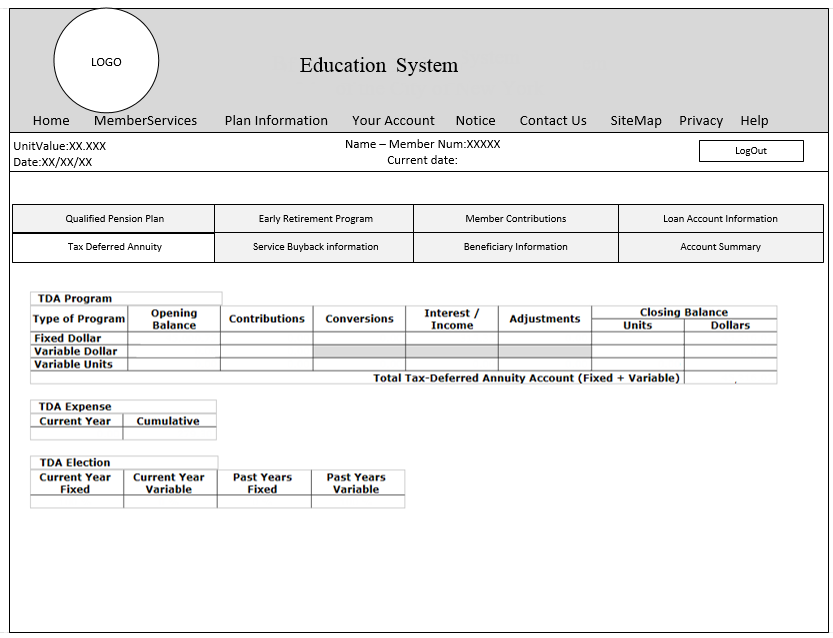
Education system services platform to be used by the teachers

I contributed across the full UX process, including:

  • User Research
  • Stakeholder Discovery
  • Information Architecture
  • Wireframing & Prototyping
  • Usability Testing
  • Front-End Collaboration

I worked closely with stakeholders, developers, and users to shape both the product strategy and interaction design.

RESOURCES

Stakeholder Discovery

Through stakeholder workshops, we aligned on:

  • Business goals for digital adoption
  • User pain points and trust barriers
  • Feature prioritization based on value and implementation complexity
  • Technical constraints and feasibility with engineering teams

A major theme that emerged early was the need to make digital statements feel as reliable as paper statements.

User Research

User Interviews

We interviewed both members and administrators to understand behaviors, expectations, and concerns.

  • How often do you check statements online?
  • Do you still rely on paper statements?
  • What is missing in current online statements?
  • What makes you trust paper more than digital?

Key Insights

Users wanted:

  • Easy access to account information anytime
  • Better visibility across multiple accounts
  • Easier access to historical statements
  • Confidence that online information matched paper records

Users struggled with:

  • Low trust in digital statements
  • Fragmented navigation across accounts
  • Difficulty retrieving past information
  • Security concerns with mailed paper statements

Contextual Inquiry

I conducted contextual inquiry sessions at users’ desks to observe how they actually managed their accounts.

This revealed:

  • Real-world workflows
  • Behavioral patterns
  • Pain points not surfaced in interviews
  • Opportunities to simplify navigation and information access

Affinity Mapping

Research findings were synthesized through affinity mapping to identify recurring themes around:.

  • Trust
  • Accessibility
  • Information retrieval
  • Navigation friction
  • Cross-account visibility

These themes directly informed the product structure.

Personas

Mike

Age: 50

Profile: Multi-account user with moderate digital comfort

Goals

  • Stay informed about account activity
  • Track monthly distributions across accounts
  • Reach customer support easily

Challenges

  • Strong trust in paper statements
  • Difficulty navigating multiple accounts online
  • Friction managing and retrieving historical statements

Christie

Age: 35

Profile: Digitally confident user

Goals

  • Access statements on demand
  • Eliminate dependency on mailed statements
  • Use digital as primary account management channel

Challenges

  • Frustration with unnecessary paper copies
  • Concerns about security risks with mailed statements

Information Architecture

Card Sorting

Conducted open card sorting with employees to understand how users grouped and expected to find information.

Information Architecture Design

Based on research and card sorting outcomes, I designed the information architecture to improve:
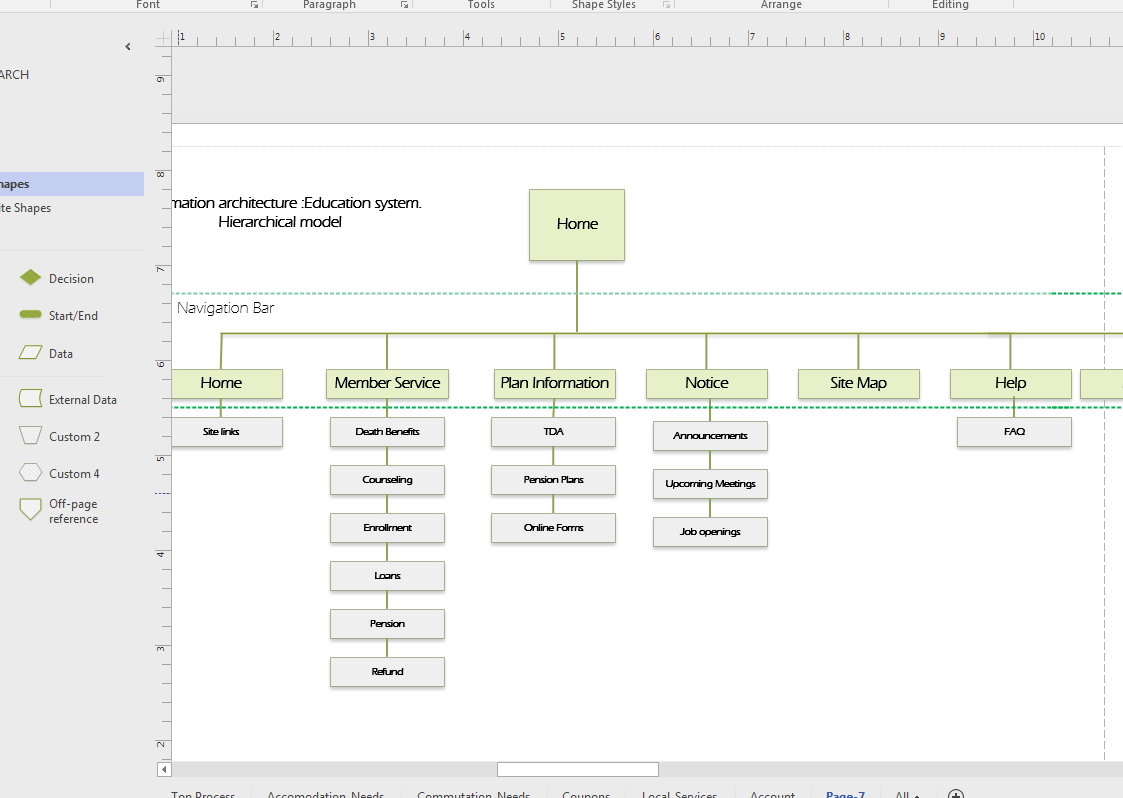
  • Discoverability
  • Account navigation
  • Statement access
  • Information hierarchy

Wireframing & Prototyping

Started with low-fidelity wireframes to validate content structure and navigation with stakeholders and engineering.

Once aligned, I developed interactive prototypes for usability testing.

Usability Testing

Testing revealed a major issue:

Users resisted navigating across multiple pages to manage separate accounts.

Key Design Pivot

We redesigned the experience as a single-page application with:

  • Account views organized by tabs
  • Faster switching across accounts
  • Reduced navigation friction
  • Stronger information continuity

Trust Design Decision

We also intentionally designed the online statements to visually mirror paper statements.

This significantly improved user confidence because the digital experience felt familiar.

Outcome

The redesign improved:

  • Usability across multiple accounts
  • Trust in digital statements
  • Ease of historical statement retrieval
  • Likelihood of e-statement adoption

The project transformed online statements from a low-trust utility into a more intuitive and reliable digital experience.
Key UX Methods Used

  • Stakeholder Workshops
  • User Interviews
  • Contextual Inquiry
  • Affinity Mapping
  • Personas
  • Card Sorting
  • Information Architecture
  • Wireframing
  • Prototyping
  • Usability Testing
  • Iterative Design

Thank You